





























Basic Audio Connections and Setups
Author: SWAMP Industries
Posted: 6 September 2026
Synopsis: The main cable types and connectors, balanced vs unbalanced, and connecting instruments to a PA cleanly. Lesson 2 of the SWAMP audio production course.

Lesson 2 of 7
Back to course overviewLessons in this course
Cables, Connectors and Getting Signal Into the PA
Every audio setup comes down to getting the right signal down the right cable into the right input. This lesson covers the main cable and connector types (XLR, 1/4 inch, RCA and Speakon), when a connection is balanced or unbalanced, and how to connect instruments to a PA system cleanly with DI boxes and correct gain settings.
Essential Cables and Connections
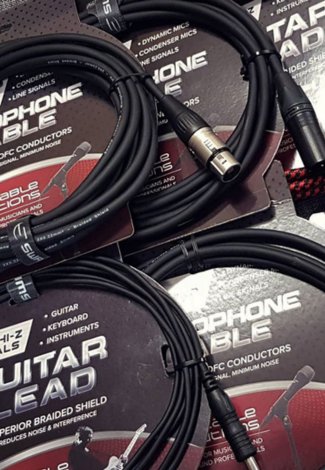
Audio cables are designed to carry different types of signals, including Hi-Z (high impedance), mic level, and line level. Each cable type has specific uses and connector types that match the requirements of various audio equipment. For example, guitar cables are made for Hi-Z instrument signals, while microphone cables are designed for low-Z (low impedance) mic signals. Line level signals can often be carried through the same cables used for mic level signals, making them versatile for different audio connections. This lesson covers the essentials; for the full deep dive into every cable, connector and signal type, see our guide Cables, Connectors and Analog Audio Signal Types Explained.
-
XLR Cables
XLR cables are widely used for connecting microphones to mixers or audio interfaces. They are balanced cables, which means they help reduce noise over long cable runs, making them ideal for professional audio setups. XLR cables have three pins and are commonly used with microphones, as well as some mixers and powered speakers.
-
1/4 Inch (TS and TRS) Cables
1/4 inch cables come in two main types: TS (Tip-Sleeve) and TRS (Tip-Ring-Sleeve). TS cables are unbalanced and typically used for instruments like electric guitars, while TRS cables are balanced and can be used for stereo or balanced mono connections. Understanding the difference is crucial for preventing noise interference and ensuring a stable connection.
-
RCA Cables
RCA cables are unbalanced connectors often used in consumer audio equipment, such as home audio systems or DJ setups. They are typically used for line-level connections, and while they do not provide noise resistance like balanced cables, they are suitable for shorter cable runs.
-
Speakon Cables
Speakon connectors are specifically designed for high-power connections between amplifiers and speakers. Unlike standard audio cables, speaker cables with Speakon connectors carry high current and are made with thicker copper wires to handle the power requirements of speaker systems. Some people may be accustomed to speaker cables with bare wire ends; however, Speakon connectors are safer and help maintain signal integrity by ensuring a secure connection.
While guitar amp heads often connect to speaker cabinets using 1/4 inch TS connectors, these cables are not the same as standard guitar cables. Speaker cables must use thicker copper conductors to handle the high power levels between an amp and a speaker. Using a standard guitar cable in place of a speaker cable can lead to poor performance and potential damage to the equipment.
Balanced vs. Unbalanced Audio Signals
Audio signals can be either balanced or unbalanced. Balanced signals use three conductors (positive, negative, and ground) and cancel out noise picked up along the cable. Microphones are almost always connected with balanced cables (e.g., XLR to XLR) because they produce weak signals that are particularly susceptible to noise interference over long distances. In contrast, Hi-Z instrument signals (like those from guitars) are typically unbalanced, which suits their higher signal levels and shorter cable runs without the need for noise cancellation.
Line level signals are commonly balanced when using XLR or 1/4 inch TRS connectors, as these connectors support the necessary three-conductor configuration. However, if either the input or output uses RCA connectors, the signal cannot be balanced. RCA connectors have only two conductors (positive and ground), which limits them to unbalanced audio transmission. For a deeper dive into how balanced lines reject noise, see our guide to balanced vs unbalanced audio.
Connecting Instruments to a PA System
Connecting instruments to a PA system involves a few essential steps to ensure clear and balanced sound output. Each instrument and device requires specific connections and considerations for optimal performance in a live sound setup. Here is a step-by-step guide for connecting instruments to a PA system.
-
Direct Instrument Connection
Electronic instruments, like keyboards, synthesisers, and electronic drum kits, typically connect to 240V power supplies and have internal electronics that boost their output to line level. This line level signal can be connected directly to the line inputs on a mixing desk or PA system without needing additional amplification. These instruments generally use a 1/4 inch TRS or TS cable to connect to the mixer's line inputs, ensuring a clean signal path with adequate volume for the PA system. When connecting directly to a mixer, it is important to match the instrument's output type to the input type on the mixer to avoid signal issues.
-
Using DI Boxes
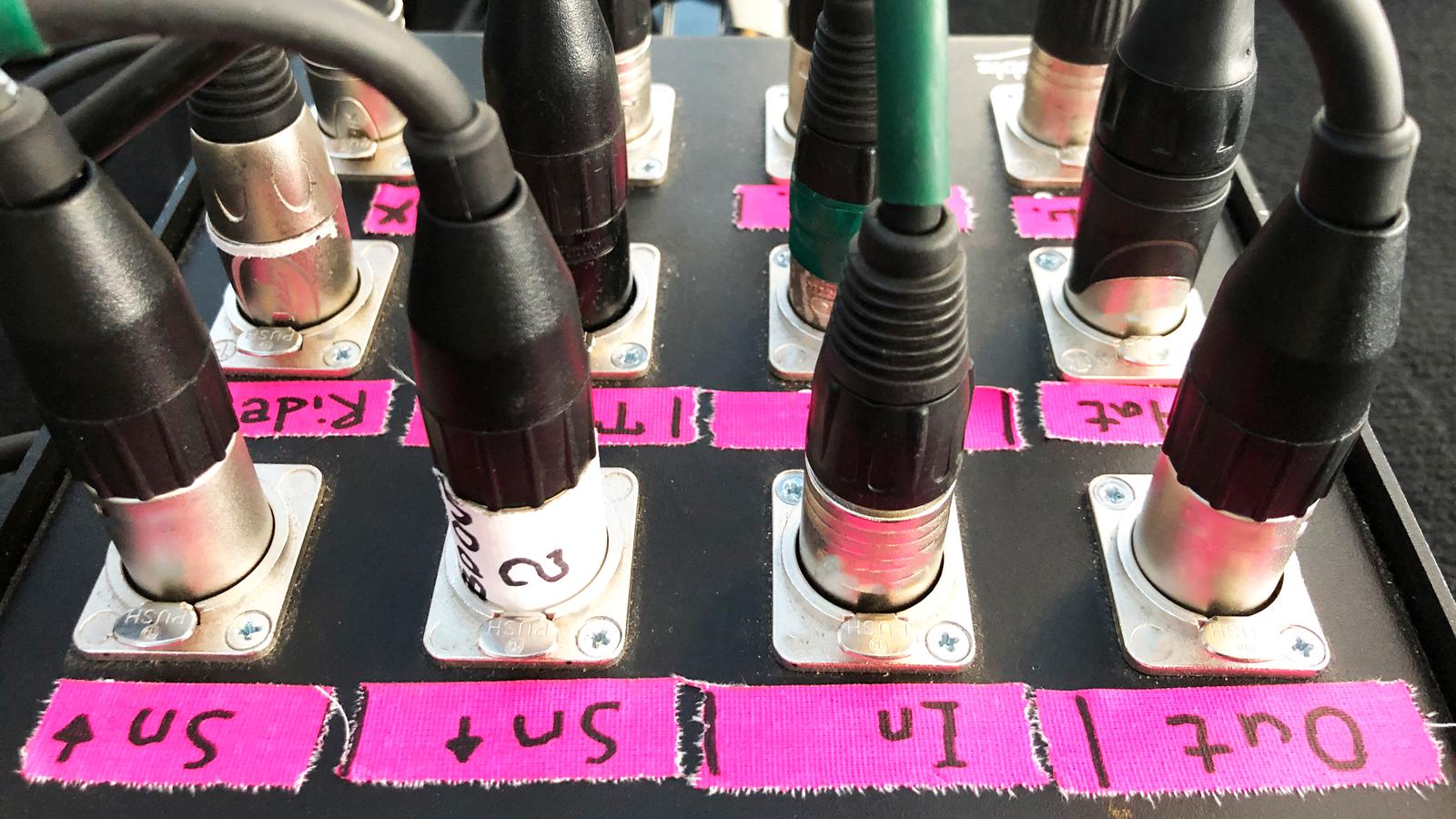
A DI box (Direct Injection box) is commonly used for instruments with high-impedance outputs, like electric guitars and basses, which produce unbalanced Hi-Z signals. A DI box converts these Hi-Z signals into Low-Z mic level signals, making them suitable for connection to the XLR input on a mixing console. The DI box also balances the signal, which reduces noise over long cable runs - particularly important in live sound setups where instruments connect through stage boxes to a front-of-house mixer.
The industry-standard example is the passive Radial JDI ($394.99), while active DI boxes suit low-output sources such as passive acoustic pickups. Some amplifiers, especially bass amps, have a built-in XLR output that functions as an internal DI box. This XLR output allows you to send a balanced signal directly to the mixer, making it easier to control the instrument's volume and tone in the PA system without needing an external DI box. DI boxes are an essential part of any live sound setup, ensuring the quality and consistency of instrument signals in larger venues.
-
Signal Flow through the Mixer
Once the instrument is connected to the mixer, setting the correct gain is essential to avoid distortion or signal clipping. The gain setting will vary depending on the input type - XLR (mic level) or 1/4 inch (line level). Note that both inputs cannot be used simultaneously on the same mixer channel, so select the correct input for each signal source.
Most mixers feature an insert connector, which allows external effects like equalisers or compressors to be integrated directly into a channel's signal path. AUX outputs on the mixer are used to send custom mixes to foldback (monitor) speakers, allowing each musician to hear a tailored version of the main mix. Multiple AUX outputs enable individual mixes for different performers or foldback speakers.
Some mixers also have sub-group functionality, allowing sound technicians to group related inputs, like all drum kit mics, into a single sub-mix. This grouping enables quick adjustments of the entire group's volume with a single fader before it reaches the main mix. Finally, the main outputs on the mixer send the balanced line level signal to the PA system's front-of-house speakers.
-
Amplification
Amplification is the final stage in the signal chain before sound reaches the audience. An amplifier increases the line level signal from the mixer to speaker level, providing enough power to drive the speakers in a PA system. The amplified signal is carried from the amplifier to passive speakers using speaker cables, which are designed to handle the high current and voltage necessary for loudspeaker operation.
In systems with powered (active) speakers, the amplifier is built into each speaker, and the speaker cable connection is internal and very short. Although less visible in powered setups, the same principle of amplification applies. Proper amplifier selection and volume control are critical for maintaining sound clarity and avoiding damage to the speakers.
Summary
Reliable audio starts with the right connections. XLR carries balanced mic and line signals, 1/4 inch TS suits unbalanced instrument signals while TRS adds balanced and stereo capability, RCA covers short consumer line runs, and Speakon-terminated speaker cables handle the high current between amplifiers and passive speakers. Balanced connections reject noise over distance, DI boxes convert Hi-Z instrument outputs into clean balanced mic level signals, and correct gain setting at the mixer keeps every source clear of noise and distortion. Master these fundamentals and connecting any instrument to any system becomes routine.
Continue the course
- Previous lesson: Understanding Signal Flow in Audio Systems
- Next lesson: Introduction to Audio Interfaces and Digital Recording
- Course overview: Audio Production Course
Every connection covered in this course starts with the right lead. Browse the full range of Cables and Connectors at SWAMP, or add a DI Box to get instrument signals to the desk clean and balanced.